
Want to know when your motorkit.com order will be shipped from our warehouse? Here is everything you need to know about our preparation times.
1. Our shipping days
Orders are prepared and shipped every day, except Sunday.
Concretely:
- From Monday to Saturday: preparation and shipping of paid orders
- On Sunday: our teams do not prepare orders, but you can of course order online 24/7
2. The time depends on stock availability
The shipping time of your order depends on the availability of the items you have chosen. Before ordering, you can check the stock of each product directly on its product page.
? How to check a product's stock?
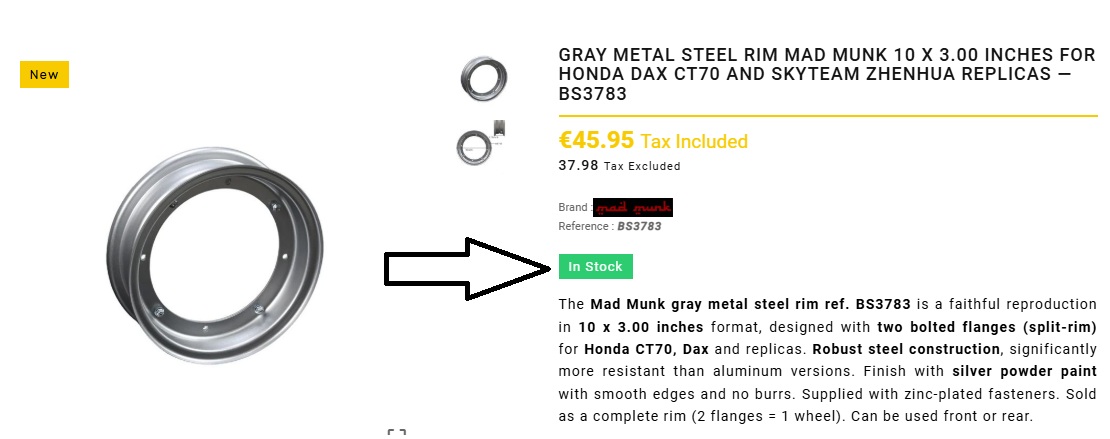
On the product page, next to the price, the stock status is displayed:
- "In stock": the product is immediately available in our warehouse
- "Limited stock": the product is available in reduced quantity, order quickly
- "On order" or specified time: the product must be ordered from our supplier
See image below: example of a product "In stock" on motorkit.com.
3. Case n°1: all items are in stock ✅
Your order ships directly on the next working day (Monday to Saturday).
Example:
- Order validated and paid on Tuesday at 2pm → shipment Tuesday evening or Wednesday morning
- Order validated on Saturday at 10pm → shipment on Monday
- Order validated on Sunday → shipment on Monday
The chosen payment method can influence the departure: credit card, Bancontact, Apple/Google Pay and iDEAL are validated instantly. SEPA bank transfer requires the actual receipt of funds (1 to 3 working days) before preparation.
4. Case n°2: one or more items are not in stock ?
If your order contains an item "On order" or with a specific supply time:
- We group your entire order for a single shipment
- Shipment takes place as soon as all items are available in our warehouse
- The supply time depends on our supplier and is indicated on the product page
Prefer to receive available items earlier? Contact us at support@motorkit.com to study a split shipment. Additional shipping costs may apply for the second shipment.
5. How do I know if my order has shipped?
Upon shipment, you automatically receive:
A shipment confirmation email with:
- The tracking number
- The direct link to the carrier's website
- The carrier used
Remember to check your spam/junk folder if you can't find this email.
You can also check the status of your order in your customer account, under "Order history and details".
6. Tips for the fastest possible shipping
- ✅ Check the stock before ordering (status "In stock" on the product page)
- ✅ Avoid mixing items "In stock" with items "On order" if you're in a hurry
- ✅ Prefer credit card, Bancontact, iDEAL or Apple/Google Pay for instant payment validation
- ✅ Order before Saturday to avoid the Sunday break day
7. A question about your order's departure?
For any question about the shipping time of your order, write to us at support@motorkit.com specifying your order number.
Related questions
- When will I receive my order?
- How to track my order?
- How to find compatible parts for my scooter?
- How much does shipping cost?